Context
Before folders, every document lived in a single, flat repository. Users found agreements entirely through legal metadata: counterparty, agreement type, effective and expiration dates, status, and custom contract fields. The repository functioned as a structured database of agreements rather than a file system.
Enterprise users, however, arrived from general-purpose document managers and consumer cloud drives. In those environments, a document's location defines its context. Hierarchy was the primary way these users understood where a document belonged.
Country
└── Department
    └── Counterparty
        └── Agreements
The architecture needed to support an existing structure of roughly 700,000 folders spanning countries, business functions, counterparties, and nested organisational structures. A solution that worked for ten folders would instantly fail at enterprise scale.
User research and feature demand were channelled through Sales and Customer Success, who are in continuous direct contact with the enterprise user base. The technical phase and functional prototyping were executed directly on a dedicated branch in the client's repository, using Claude Code and AI-assisted development.
The core conflict
The system needed to support two load-bearing organisational models already in use by paying customers. Replacing one with the other would have degraded the product for a significant portion of the user base.
| Existing metadata model | Requested folder model |
|---|---|
| Flat document repository | Hierarchical repository |
| Counterparty, type, dates, status | Country → Department → Counterparty |
| Found through filters and metadata | Found through location |
| Built for legal workflows | Familiar from the tools they already had |
| Documents share one legal schema | Folders and documents share none |
A folder can be modified, owned, and sized. It has no counterparty, no agreement status, and no effective date. The two schemas could not merge into a single table without breaking the interface. Folders had to become a new route to reach the exact same legal work.
Exploration
I mapped the product constraints, benchmarked how adjacent enterprise platforms handled hierarchy, and quickly sketched three directions directly over the real interface to evaluate technical feasibility.
Three directions
- One (Rooms as the primary structure): Conceptually the simplest, but far too shallow for customers routinely nesting four levels deep.
- Two (Files and folders in the same table): The table would constantly switch columns or drop essential legal metadata altogether. Rejected before validation.
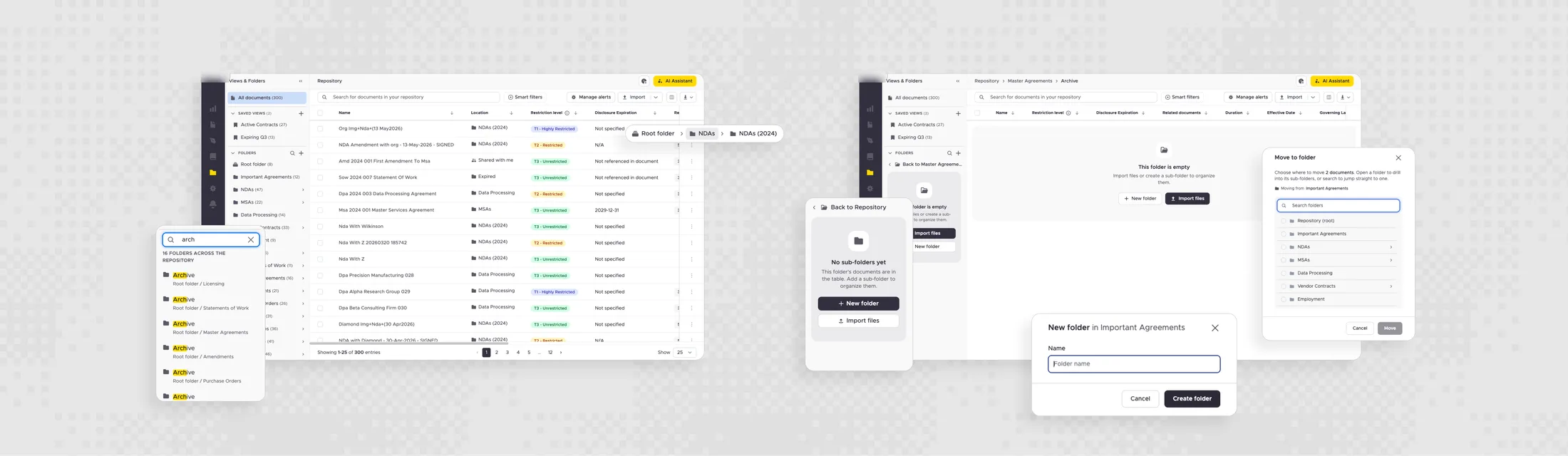
- Three (Folder navigation separated from the legal workspace): Hierarchy and location on one side, legal documents with their existing metadata untouched on the other. This became the final direction.
The product principle
Users open a folder to locate the right set of agreements. The actual work happens afterward: reviewing documents, filtering metadata, running saved views, or working with the AI assistant.
Navigation had to provide orientation and then get out of the way. The legal table remained the primary working surface.
Trade-offs and design governance
Saved views had to stay out of the hierarchy
An early proposal placed saved views inside folders. At enterprise depth, this model fractures.
Mexico
└── HR
    └── Employees
        └── 2026
            └── Agreements
└── My saved viewWe separated the concepts: folders dictate where documents live; views dictate how a user wants to look at them. Views remain highly visible and accessible from the product's dedicated area.
Scalable hierarchy vs. Engineering constraints
My proposed direction was a persistent nested tree. Engineering found significant constraints in maintaining the full tree state as users moved deeper into the hierarchy.
Because I designed directly on a branch in the real product repository, we evaluated this trade-off against the actual codebase rather than static screens. We compromised on a drill-down model. The implementation adapted to technical constraints while preserving the core product intent.
Defending scalability at enterprise level
Working in parallel — design resolving the interface while backend builds infrastructure — is the smart way to accelerate enterprise delivery. However, during development, Engineering began implementing an early, discarded exploration that placed folders as horizontal cards directly above the document table.
I pushed back on this execution to enforce design governance. Implementing an unvalidated UI pattern creates massive long-term architectural debt.
A horizontal strip of cards functions adequately for a dozen folders, but it fails completely as an information architecture for a repository holding hundreds of thousands of items. Reaching the hundredth folder required endless horizontal scrolling, swapping out the critical legal columns in the process.
Works with:
📁 HR   📁 Legal   📁 Sales

Fails with:
📁 HR 📁 Legal 📁 Sales 📁 Finance 📁 Procurement 📁 Mexico 📁 Brazil 📁 Chile 📁 NDAs 2024 … (~700,000 folders)My intervention ensured the architecture met strict enterprise requirements: deep nesting readability, rapid folder search, massive sibling folder capacity, complex permissions, and bulk content movement.
What shipped
The folder experience is currently in production. It successfully adds hierarchy without dismantling the existing repository.
The architecture was intentionally designed to accommodate future enhancements — such as drag-and-drop and folder shortcuts — without requiring users to learn a new mental model later.
We delivered an organisational layer on top of the repository. Using it is a choice; no user was forced into a new workflow.
Key learnings
- Familiar patterns must fit the specific product model. Replicating a consumer cloud drive would have destroyed the specialized legal workspace users relied on. What arrived as a navigation request was fundamentally an information-architecture problem.
- Scale dictates architecture. A pattern successful for ten items can be catastrophic for 700,000. Enterprise scale must drive decisions regarding placement, search, permissions, and progressive disclosure from the very first week.
- Protect the core requirement, negotiate the implementation. The persistent tree design was compromised due to technical limitations, but the underlying requirement for a scalable hierarchy survived intact. Identifying which elements are negotiable is the core of design work.